Read the failure before you retry it
These two failures look similar and have nothing in common. One is about you getting in. The other is about the code being accepted. Retrying is the right move for exactly one of them.
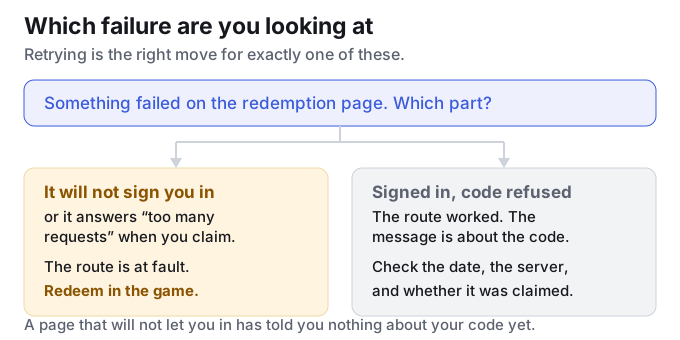
| What you see | What it usually means | What to do |
|---|---|---|
| The page will not sign you in at all | A session or rate-limit problem on that browser, not a wrong password. Players report the same account working normally in the official companion app at the same moment. | Stop retrying the login. Use the in-game redemption route instead — it does not go through the website. |
| “Too many requests” when you claim | The same thing from the other direction: the page is throttling that session. It is not an account ban and not a dead code. | Wait, or switch to the in-game route. Do not sit there clicking — that is what caused it. |
| You sign in fine, and the code is rejected | Now it really is about the code. Expiry, an account that already claimed it, the wrong server, or a stray space. | Match the message to the cause instead of trying again. |
This split is ours, from reading how players describe the two failures — the sources are named at the bottom of the page. It is not an official error-code table, because the games do not publish one.
The questions, in the words they were asked
Every question on this page is one a player actually asked in the community threads we follow. They are quoted as written, including the typos.
“I cant sign in for the redem code website” — is the site broken?
Usually not, and usually not your account either. In that same thread another player offers the explanation that fits most reports — too many people hitting it at once — and the reply that got the most agreement points somewhere else entirely:
“You dont have to log in to the game to use the codes. I was able to redeem them in game. Just click on the three dots on the smartphone where you see the option to edit the trailblazer profile. There should be a redemption code option.”
That is the practical answer. The website is one of two routes, not the only one, and the in-game route does not care whether the website is having a bad day.
“Anyone having issue of not able to do daily check-in / redeem gift code due to…”
The reply in that thread narrows it down precisely:
“Same thing, i can login via hoyolab and everything, but when you try to claim promocode you get ‘too many requests’… but i can login via hoyolab app. just the browser issue…”
Read that carefully, because it is the whole diagnosis in one line. Sign-in worked. The claim failed. The app worked where the browser did not. Nothing about the code was tested, so nothing was learned about the code.
So is “too many requests” a ban?
No. It is throttling: the page is refusing to do more work for that session right now. Nothing in the player reports we collected suggests it follows the account to another client, which is exactly why the app worked for the player quoted above.
Why does it happen more on livestream days?
Because that is when everyone tries at once. Version Special Programs hand out codes with a window of about a day, so the traffic on the redemption page spikes in the hours right after the stream — which is the same window in which the codes are still alive.
Can I redeem without opening the game?
It depends which game, and this is where people get caught out:
- Genshin Impact — yes, the website works without launching the game. But not on iOS, where the website is the only route anyway.
- Honkai: Star Rail — yes, same shape: website or in-game menu, and the in-game menu is not on iOS. Details here.
- Wuthering Waves — no. There is no redemption website at all, so the game client is the only way in. Details here.
Both routes reject the code. Now what?
Then the route is no longer the suspect and you can work on the code itself. Three checks, in this order: is it past the date on the list you found it on; is it for your server; and has this account already claimed it. The third one is the most common and the least visible — a single-use code that your own account has already spent reads exactly like an expired one. The full decoder is here.
What we cannot tell you about this
- We cannot reproduce it. We do not redeem codes ourselves, so we have never seen the error from the inside. Everything above is what players report, plus what the two routes logically allow.
- We cannot tell you how long the throttle lasts. Nobody publishes a figure, and we will not invent one. The reliable move is to switch routes rather than wait.
- We cannot tell you the code is fine. A failed sign-in tells you nothing about the code. Check the code on a dated list before you conclude it is dead.
Frequently asked questions
Is the redeem code website down right now?
We cannot see that from outside, and we will not guess. If it will not sign you in, treat it as a session problem and use the in-game route rather than waiting for a status page that does not exist.
Does “too many requests” mean my account is blocked?
No. It is the page throttling the session. Players report the same account working in the official app at the same moment, which is what you would not see if the account itself were blocked.
Why can I log in but not claim a code?
Because those are two different requests. Sign-in succeeded; the claim was throttled. The error is telling you which one failed, and that is worth more than a retry.
Should I keep retrying the login?
No. Retrying a throttled page is what makes the throttle worse, and the other route is faster than the retry loop. Switch route, then come back to the website later if you prefer it.
Where do these questions come from?
From the player threads we follow for Genshin Impact, Honkai: Star Rail and Zenless Zone Zero. They are quoted verbatim and are not official statements. We have not verified the individual posts; we are reporting what players say, because it is the only public account of these errors that exists.