One tap, four different failures
Searches for this game ask for “codes”, and what people actually want is dice. The two are not the same thing here, and that mismatch is why so much of the advice online does not help: it tells you to find a fresher list when the problem is the hand-off between your browser and the app. Sort the symptom first.
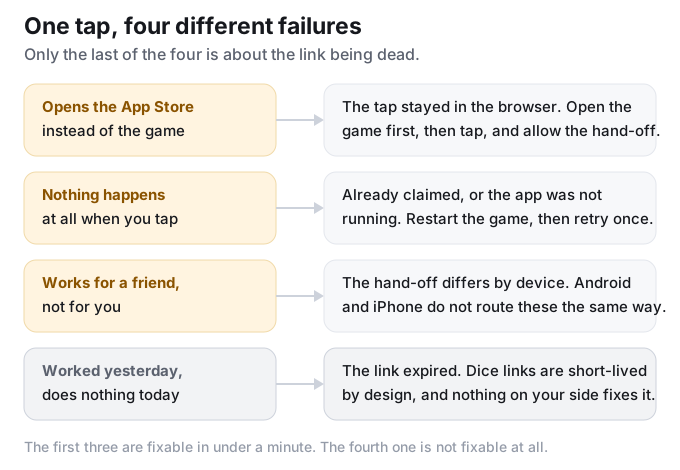
| What you see | What is actually wrong | What fixes it | Retry? |
|---|---|---|---|
| The link opens the App Store instead of the game | The tap never handed off to the app. It stayed in the browser, and the browser decided the right destination was the store page. | Open Monopoly GO first and leave it running, then tap the link again. When your browser asks whether to open it in another app, say yes. | Yes |
| Nothing happens at all when you tap | Either the link has already been claimed on this account, or the app was not running or not up to date. | Close the game completely and open it again, then retry once. If it still does nothing, that link is spent for your account. | Once, after a restart |
| It works for a friend and not for you | The same link behaves differently per device. Android and iPhone do not hand off to the app in the same way. | On iPhone, use the explicit open control instead of trusting the tap to switch apps by itself. | Yes |
| It worked yesterday and does nothing today | The link itself has expired. Dice links are short-lived by design. | Nothing you can do on your side. Get a newer link. | No |
There is a fifth failure that is not on this table because it belongs to a different page: the redemption website refusing to sign you in, or answering with a rate-limit message. That one is a route problem on the HoYoverse games and we answered the questions players ask about it separately.
Before any link pays out: level 15, and the albums feature
This is the one that gets missed entirely, and it makes a working link look broken. The list we follow states it plainly: you need to reach level 15 and unlock the in-game albums feature before these links do anything for you. On an account below that, the tap is not the problem and neither is the link.
Once you are past the gate the sequence is short and it is the same on both platforms: the link opens the app by itself, a pop-up reads “Here’s a gift for you!”, and you press the green collect button. If you are not seeing that pop-up, you are not past the gate yet, or the hand-off failed — which is the first row of the table above.
Android and iPhone are not the same tap
The most useful thing in the threads we follow is a set of reports that disagree with each other — and the disagreement is the answer. From the same thread, quoted as written:
“I don’t encounter any problems with the links on my android phone. But for iPhone, I just tap on the ‘open’ thingy that I encircled and then the link works perfectly fine.”
“I am on iphone too and it just directly sends me to the app”
Two iPhone users, opposite experiences, same game and same kind of link. That is what a hand-off problem looks like: it depends on which browser you opened the link in, whether the app was already running, and which control you pressed. It does not depend on the code list being fresh.
The recurring symptom in those threads is the store detour, and the players who reported it were specific about the difference:
“Didn’t work for me. If the link takes me to the app store, it will not work. If it goes back to the game, then in general, works for me.”
That is a player’s own observation, not a published rule, and we are reporting it as exactly that. It is also the most actionable sentence we found anywhere on this problem: watch where the link lands, and you already know whether it is going to work.
The browser fix that some people swear by — and its limit
The fix that keeps coming up is to change which browser handles the link, and for the people who did it, it worked:
“Ever since fixing to browser I never had issues”
It is worth knowing that it is not universal, and the same thread says so. One player made the change and still hit a wall, for a reason that is easy to miss:
“I made that fix in my settings but my links don’t work when shared with others in Reddit.”
Your own links, on your own phone, are a different case from someone else’s link pasted into a public thread. If the browser change fixed your own links and not the shared ones, you have not done anything wrong — you have run into the part of this that the player cannot control.
Why there is no code to type on this page
Every other game we track issues strings. You type them, they get checked, you get mail. Monopoly GO does not work that way: its “codes” are links — dice links and friend links — that carry the reward inside the link itself. There is nothing to copy and paste, which is why a list of code strings for this game would be useless even if someone published one.
The other reason this page is a diagnosis rather than a list: these links expire within days, and the pages that keep up with them are updated several times a day. We re-check our own sources once a day, so a link list from us would be stale for most of the time you were reading it. What we can do honestly is explain the failures and let you take any list — ours, or anyone’s — and tell within one tap whether it is going to work.
What we do not do is print links we have not verified. A dead link looks exactly like a live one until you tap it, and we are not going to fill a table with strings we cannot stand behind.
Frequently asked questions
What are the Monopoly GO codes right now?
There is no code string to give you. A Monopoly GO code is a link, and the working ones change within days. What this page answers is the question underneath the search — why the link you already have is not opening — because that is the part you can actually fix.
Why does the link take me to the App Store instead of the game?
Because the tap stayed in the browser and the browser decided the store page was the right destination. Open the game first, leave it running, then tap the link, and allow the “open in another app” prompt when it appears.
Why do links work for other people and not for me?
Because the hand-off is per device. In the thread we follow, two iPhone users reported opposite results on the same kind of link, and one of them had to use the explicit open control rather than relying on the tap. Android and iPhone do not route these links the same way.
Do I need to be a certain level?
Yes. The list we follow states that you need to reach level 15 and unlock the in-game albums feature before these links pay out. Below that, a working link looks exactly like a broken one.
Is there anything to type into a code box?
No. Unlike Genshin Impact or Star Rail, this game has no code box to paste a string into — the reward travels inside the link. That is also why “free dice links” and “codes” get used as if they were the same phrase when they are not.
Should I keep tapping a link that did nothing?
Restart the game and try once more. If it still does nothing, the link is spent for your account and tapping it again will not change that. A link that was already claimed and a link that expired look identical from the outside.
What we cannot tell you about this
We cannot see your account, your level, or which browser you tapped the link in, so nothing on this page tells you whether your specific tap was already claimed. What we can do is keep the four failure modes separated, because they get collapsed into one sentence — “the links don’t work” — everywhere else.
For the games where there is a string to type, we do keep a status and a date on every code. Our Genshin Impact list is here, and there is a code list for Star Rail, Wuthering Waves, Zenless Zone Zero, Honkai Impact 3rd and Raid: Shadow Legends as well.