The answer, and the argument behind it
The question comes up the same way every time: somebody is away from the machine they normally play on, and wants to know whether that rules them out. In the Wuthering Waves thread we follow it is asked twice — once as the original post, and once in the replies as a disagreement about how accounts work:
“Is there a way to input redeem codes not on PC? I’m away from my PC and won’t be back until tomorrow evening :(”
“Not even from mobile? Correct me if i’m wrong, can’t you sign into the same accounts on multiple devices?”
The reply that answers the original post is a route rather than a list of platforms, which is the useful part:
“Open the game on whatever console/mobile/PC and open the Terminal, than click on the Settings icon in the bottom right corner. Select the Other Settings tab from the menu. Find ‘Redemption Code’ under…”
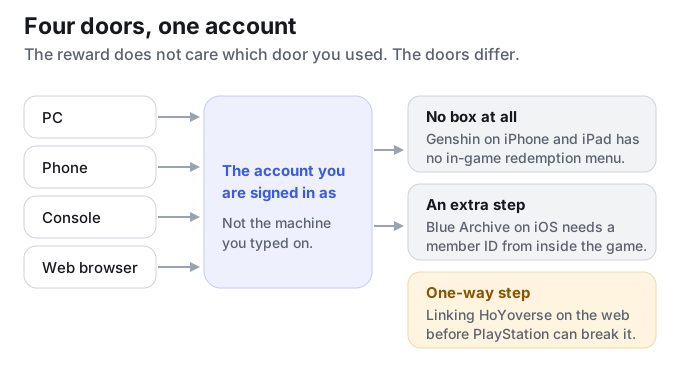
Read that sentence again with the question in mind. The answer starts with “on whatever console/mobile/PC” — the box is in the game, and the game is on the device you have. The redemption lands on the account you are signed in as, not on the machine you typed it from. Our Genshin redemption walkthrough states the same thing as one of its PlayStation mistakes: if you play on two platforms, make sure you redeem on the account that holds the progress you want the reward on.
When the device has no box at all
The clearest device difference we can state as behaviour rather than as a player report is on Genshin Impact’s iOS build: there is no in-game redemption menu on iPhone and iPad. On that platform the official web page is not a shortcut, it is the only route a code can take. If you are hunting through the in-game menus on an iPhone for a box to paste a code into, you are looking for something that was never built.
This is the one place where the device question has a hard answer rather than a soft one. Everywhere else, being away from your usual machine costs you nothing but a different menu path.
When the device changes the route
Two games in our set make the phone platform decide which steps you take, and both of them are written up in the threads we keep. The first is Blue Archive, where the iOS route starts inside the game and ends on the web:
“Unless you’re on iOS where you instead must go get your member ID by logging in to the game > touching the icon in the upper right corner > Press [Menu Tab] > [Account] > [Customer Center] > and then …”
The second is Monopoly GO, where the same link behaves differently on the two phone platforms — and the thread is specific about which one is the awkward one:
“I don’t encounter any problems with the links on my android phone. But for iPhone, I just tap on the ‘open’ thingy that I encircled and then the link works perfectly fine.”
In both cases the account is the same account. What changed is the number of steps between you and the box, and in Blue Archive’s case an identifier that only the game itself will hand you.
The Blue Archive route is on its own page, and the Monopoly GO link cases are sorted on the Monopoly GO page.
The one that cannot be undone
Everything above is reversible: a different menu, an extra identifier, a link that needs one more tap. There is one exception, and it is on the Genshin side. The official redemption page’s own behaviour carries a warning about the order in which you set up an account: creating a HoYoverse account on the web first and then associating it with PlayStation can permanently break that association. It is listed there as one of the common mistakes, and it is the only device-related step in our set that does not have a way back.
The practical consequence is narrow but worth knowing before you start: if you have not linked a HoYoverse account to your PlayStation yet, create it from the console rather than from a browser. Redeeming from a phone or a laptop afterwards is fine — it is the order of the first link that matters, not the device you redeem from later.
Sorting it before you spend an evening on it
- Ask what the code is attached to. The redemption follows the account you are signed in as. If you are signed in on the device in your hand, the device is not the problem.
- Find out whether your platform has a box. Genshin on iPhone and iPad does not — the web page is the route there, and looking for an in-game menu will waste the evening.
- Expect an extra step on some phones. Blue Archive’s iOS route needs a member ID from inside the game before the web page will take anything.
- Do not link an account from a browser if you have not linked it on console yet. That is the one step in this set that can be permanent.
- If the box exists and the account is right, the problem is the code. From there the question is whether a source still carries it — which is what our tables answer row by row.
What we cannot tell you about this
We cannot tell you whether a specific code will be accepted on a specific device, because that depends on the account and on the platform rules at the time you try. What we do keep is the route each game takes and the notes a source attached to a code, on the row it belongs to, so a code that only works somewhere specific is not sitting in a list looking universal.
The iOS menu behaviour and the PlayStation linking warning come from the official redemption page’s own behaviour as we recorded it. The quotes above are player posts from our source library, kept as they were written. They are not official statements and we have not verified the individual posts.
Frequently asked questions
Do I have to redeem on the device I play on?
No. A redemption credits the account you are signed in as, so the device you type on does not have to be the device you play on. In the thread we follow, the answer to exactly that question is a route that starts with “open the game on whatever console/mobile/PC”.
Does Genshin Impact have an in-game code box on iPhone?
No. There is no in-game redemption menu on iOS, so the official web page is the only route there. On other platforms the in-game menu exists.
Why does a code need an extra step on iOS in Blue Archive?
Because the iOS route starts in the game: you take your member ID from inside the game first, then use the web page. The Android route does not need that identifier.
Can I break my account by redeeming from the wrong place?
Redeeming does not break anything. Linking can. The official redemption page warns that creating a HoYoverse account on the web before associating it with PlayStation can permanently break that association, so if the link does not exist yet, make it from the console.
I redeemed on a second device and the reward did not show up. Why?
Because the reward went to the account you were signed in as, which may not be the one holding your progress. Our Genshin walkthrough lists this as a PlayStation mistake: check which account holds the progress you wanted the reward on before you redeem.
Does the device change whether a code is valid?
It can change whether the code is allowed there at all. Some codes are refused on a platform or a server before their validity is ever checked — we sorted those refusals separately on the platform-lock page.